
 Frank van Esch
It comes up in almost every project at least once: do we put this in a SharePoint list or in Dataverse? Often the answer has settled before anyone says it out loud, on instinct. And usually that instinct is right. But it helps to know why, because the choice is hard to undo once there are months of data and forms sitting on it.
Both are fine places to keep data. They just do not solve the same problem. A list is a list. Dataverse is a database with rules. Below are the trade-offs we weigh in practice, without dogma, because we regularly pick both inside the same organisation.
What a SharePoint list does well
A SharePoint list is faster to stand up than people expect, and it costs nothing extra. It sits inside your Microsoft 365 licence, needs no premium connector, and for flat, list-like data it does the job. A sign-up form, a materials register, an overview of requests that mostly hangs off documents: a list is at home there.
Its strength is proximity. The data lives next to the document library, the Teams site and the people already working there. A simple Power Automate flow on top, a view or two, and you have something working by the end of the week. For many internal processes that is exactly enough, and anything heavier would be waste.
Where the list starts to strain
The edge shows up the moment you start linking and growing. Lookups between lists exist, but they are brittle. There is no real referential integrity, so nothing stops someone deleting a record that fifty others still point to. What is left are references to nothing, and you only notice when a report returns odd numbers.
Then there is the well-known 5,000-item line. Past it, the list view threshold starts to bite: filtering on a column that is not indexed stops working, and in Power Apps you get delegation warnings. That warning is more annoying than it looks, because your app keeps running. It just quietly returns incomplete results, which is exactly the kind of error nobody spots until it goes wrong.
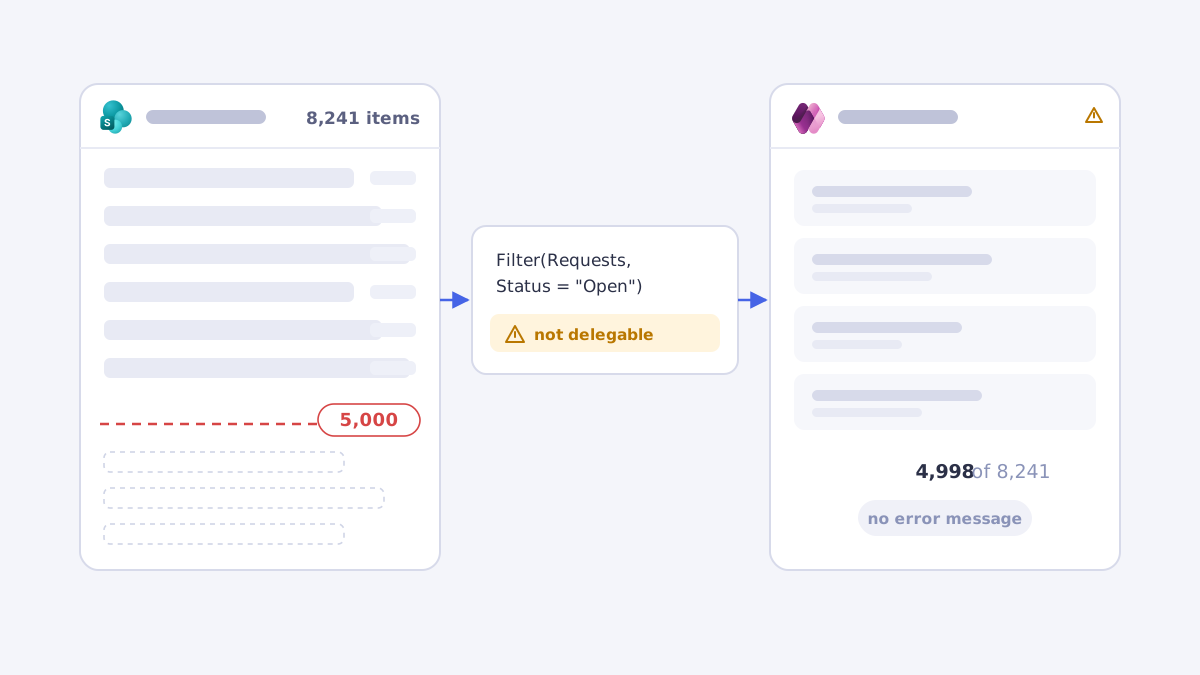
You can get a long way with indexed columns and carefully built views, and we do. But you notice you are fighting the tool. At some point that is a signal, not a chore.
What Dataverse gives you
Dataverse is the other side. You get real relationships between tables, with integrity guarded by the database instead of your flow. You get row-level security through security roles, choice columns that actually mean something, and server-side logic with business rules that runs whether the user arrives through an app, a flow or the API. For data with several entities that reference each other, or data where security has to be tight, that is the difference between building and forever rebuilding.
The second thing you get is calm as it grows. A table with hundreds of thousands of rows is no problem, queries stay delegable, and you do not have to rework your architecture halfway because a threshold is coming into view. If you know a process will grow, you are better off choosing that calm up front than after the fact.
The price of Dataverse
That comes at a price, literally. Dataverse needs premium licences, and it adds up per user or per app. For an internal tool with two hundred staff that is a number you want to know in advance, not one you discover at the first renewal. The cost is often easy to defend, certainly when the process matters, but it belongs in the trade-off.
The other side of the same coin: pushing a simple internal form into Dataverse because it feels 'tidier' is just as wrong as cramming everything into a list. Heavy tooling for light work costs maintenance, licences and explaining, without making anyone better off. The right answer depends on what the work needs, and that is rarely what looks best on an architecture diagram.
The rules of thumb we keep
When we are unsure, we fall back on a few rules. They are not absolute, but they take the conversation to the heart of it quickly.
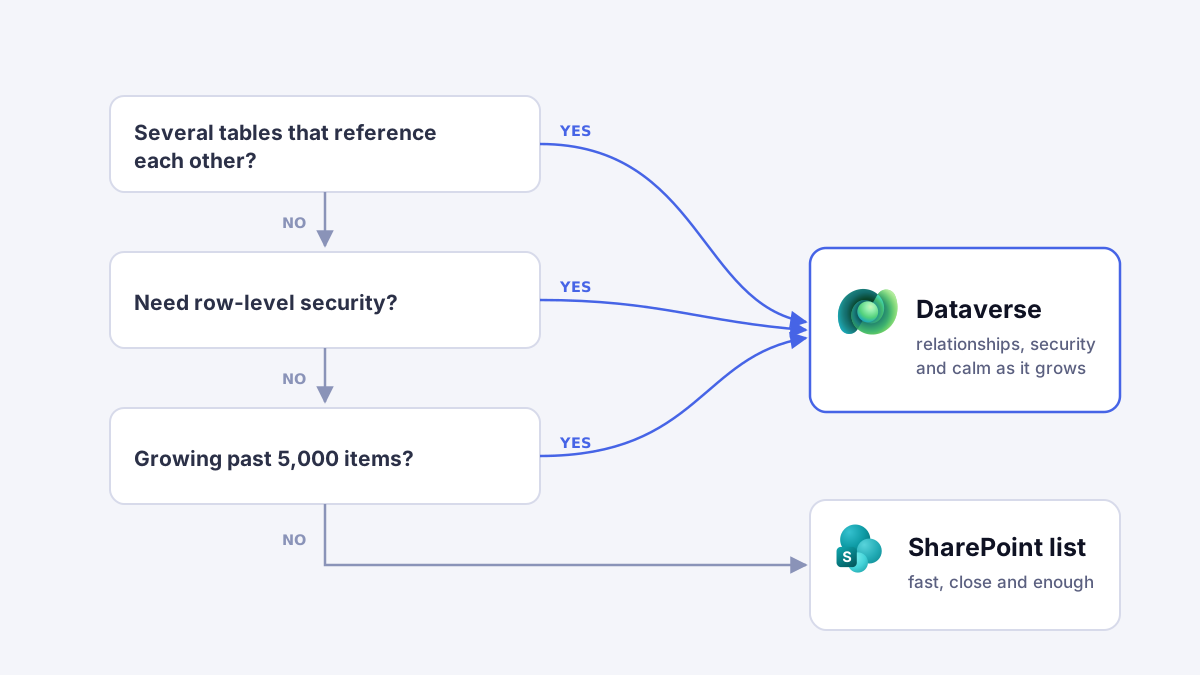
- One flat entity, few relationships, limited volume, close to documents: SharePoint.
- Several related tables, integrity or row-level security needed, and it is growing: Dataverse.
- Still unsure? Do not judge it by what it is today, look at where it will be in two years and who will own it by then.
The most expensive mistake is usually not the wrong choice, but the choice you revisit too late. Migrating a list that slowly became a database over to Dataverse while a hundred people already work on it costs a multiple of what it would have cost up front.
So the annoying answer stays 'it depends', but the dependency is at least nameable. Most of the regret we see comes from lists that outgrew the tool, not from Dataverse being too heavy. If you are torn between the two, you are probably already doubting the list. That is an answer in itself.